
The initial resource search should be a systematic project. You can categorize and organize information, then conduct targeted searches from different directions. However, categorization is based on the premise of having comparisons.
Here, everyone should look at introduction posts for various universities. Whether you apply or not, take a look. It doesn't take much time, but it can effectively help you build a macro-level understanding of universities.
Many students initially don't know what to look for or how to find it. How do you get started? By treating yourself as an enrolled student.
Treat yourself as an official freshman
Don't be misled by the "Prospective Students" link on websites. Information that cannot be found under "Prospective Students" is all located under "Undergraduates."
The core of finding information lies in imagining yourself as an official student and thinking about what benefits an official student would gain at the university.
Immerse yourself in the role to find information. Positioning yourself as a freshman is mainly because online resources often provide in-depth introductions to the university specifically for freshmen. If you always position yourself as a visitor, you will only get a superficial glimpse.
Specific Approach
1. Professors
Basically, follow this path: Academics --> School or College --> Department --> Chemistry (or the department your child is interested in) --> Staff. Then, look up all the names on Wikipedia. A distinguished professor can be very impressive.
2. Courses
Every university should have a student catalog or something similar, covering various aspects including courses. However, since each university hides this information in different places, there is no unified linking strategy. Of course, searching by department also works. In many departments, if you click into the "Undergraduate" section, you might find links such as "Courses" or "Coursework."
Sometimes, clicking the "Advising" button can also lead you to useful information. This section often focuses on course selection requirements for graduation and various combination plans, which you can also refer to.
Some courses are also very impressive. For example, there is a course called Nanotechnology. Most universities (including Ivy League schools) do not cover this area, and even if they do, few offer it as a standalone course (this highlights the importance of having a macro-level understanding; having some general knowledge gives you direction, right?). However, for most universities, it is impossible to filter through every course in the student catalog one by one—that would be exhausting. Actually, you can join the QQ groups for Chinese international students at that university to infiltrate and gather intelligence.
3. Academic Policies and Various Programs
Double Major, Triple Major—these mainly involve how many courses you can choose, whether there are Distribution Requirements, accelerated programs, etc. There are also other types of plans that are very powerful and can be used to demonstrate your interdisciplinary goals. There are also programs like those at Duke University that focus on giving back to society, which can also be discussed.
These details are scattered across various parts of the university website, but they are basically all within the "Academics" section. The Student Catalog contains a lot of information, but reading it line by line is strenuous. (If everyone could research it thoroughly, what would we need advisors and counselors for?) It is recommended to ask senior students.
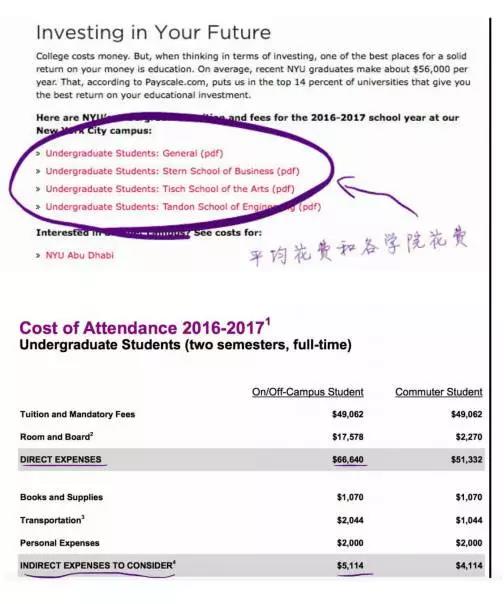
How to Check Tuition Fees on the University Website
After opening the university's homepage, you can see entries for various options. "Admission" refers to admission details. "Schools" refers to links for admission requirements for different colleges. "Financial Aid" refers to scholarship and financial aid policies.

Taking New York University as an example: